Capture first, organize later.
Drop ideas, screenshots, links, voice notes, and files into one inbox first. When it is time to write, let AI shape them into clear, editable Markdown notes.
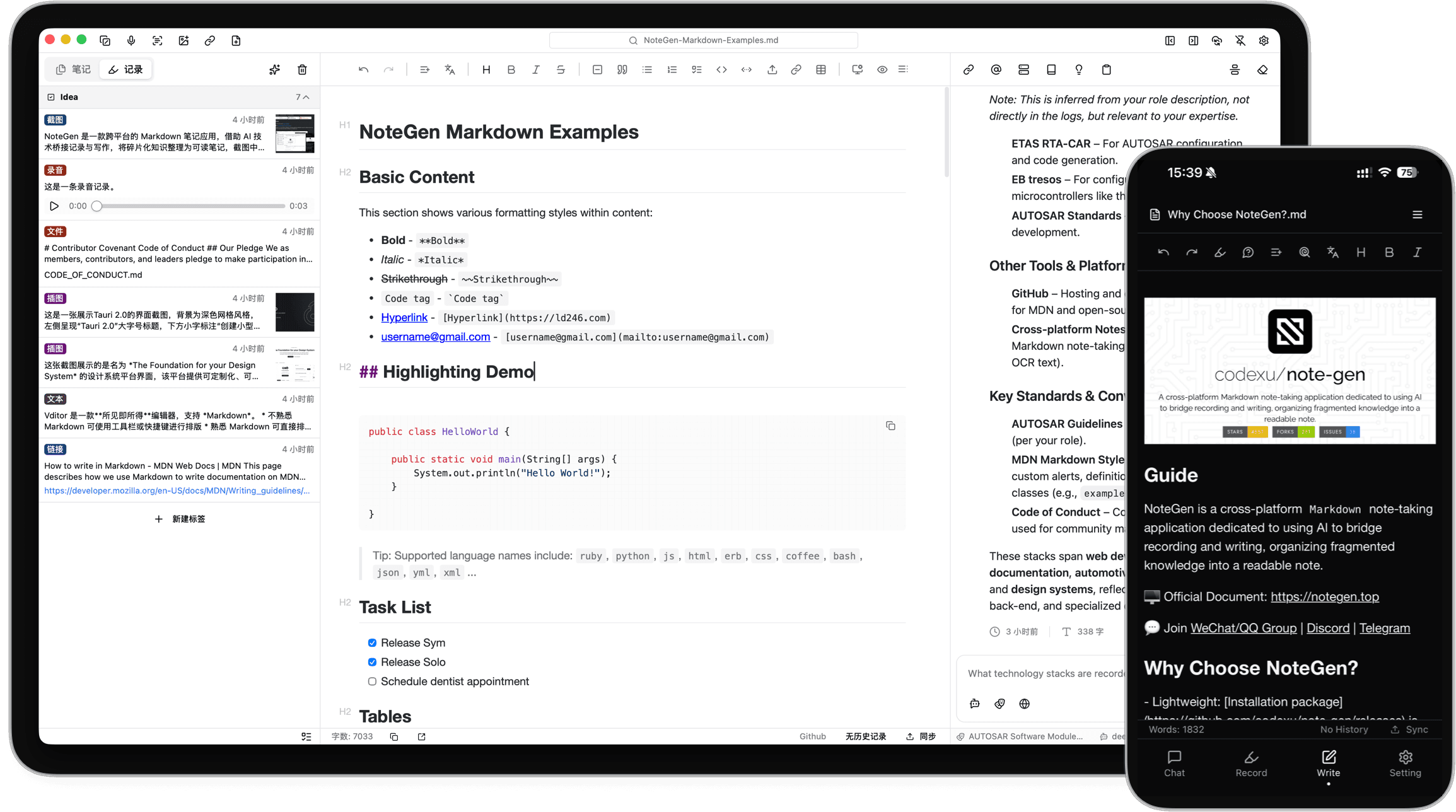
Save it first
Capture without breaking flow
Capture ideas, screenshots, links, voice, and files first. Sort later.
From scattered to clear
AI organizes for you
Drop in scattered records. AI turns them into clear, editable notes.
Standard Markdown
Keep writing
Organized notes stay in Markdown, ready to edit, expand, and keep.
Local first
Your data stays yours
Stored locally first. Start without login and keep control of your notes.
Desktop + mobile
Capture anywhere, sync for free
Record on desktop or mobile, then sync across devices for free.
Built for the long run
Open source and free
No ads, no fees, open source. Built for long-term use.
Let AI understand your notes
More than chat. NoteGen AI can read your documents and local notes to help rewrite, search, organize, and complete complex tasks.
Rewrite with context
Understands the note
AI reads the current note, then helps expand, rewrite, polish, or restructure it.
Search your notes
Local knowledge
Retrieve related local notes so answers stay grounded in your own material.
Handle multi-step tasks
Custom Skills
Turn repeat workflows into Skills so AI can organize, generate, or process content step by step.
Connect external tools
MCP extensions
Use MCP to connect search, APIs, or services for advanced workflows.
Capture anything first
Save what you see and what you think first. Organize only when you need to write.
Text Recording
Save thoughts, snippets, and drafts quickly.
Screenshot Recording
Capture the screen and recognize text or visuals.
Image Recording
Keep image references for later notes.
Link Recording
Save links and extract page details.
File Recording
Import text and PDF files as usable material.
Voice Recording
Dictate ideas and turn them into text.
Todo Recording
Save quick tasks and keep action items visible.
Turn captures into notes
Choose a template, select records, and let AI draft an editable Markdown note.
Template-based organizing
Use enabled templates or continue with your last one.
Flexible record selection
Filter by range or tags, or manually pick records.
Preview every record type
Text, images, links, audio, and todos can be combined.
Stream into a note
Set title, location, and rules, then draft Markdown.
AI models ready to use
Built-in free models cover organizing, search, and image understanding. You can also connect your own model service when needed.

Chat and organize
Qwen/Qwen3-8B
Summarize, rewrite, and draft notes for everyday organizing.
Semantic search
BAAI/bge-m3
Find related local notes so answers stay grounded in your material.
Image understanding
THUDM/GLM-4.1V-9B-Thinking
Read screenshots, images, and OCR content beyond raw files.
Built-in models are enough to start. For higher requirements, switch to your own model in settings.
Try stronger models when needed
Some advanced models are available for limited trials, useful for heavier organizing, understanding, and generation.
Keep one note library across devices
Choose a free sync option you trust, keep notes moving across devices, and stay in control of your data.
GitHub Sync
Sync Markdown notes across devices with your GitHub account.
Gitee Sync
A stable free repository option for syncing in China.
GitLab Sync
Works for teams and self-hosted GitLab setups.
Gitea Sync
A lightweight self-hosted option for your own note storage.
WebDAV
Connect NAS, cloud drives, or private WebDAV storage.
S3
Use object storage for flexible long-term sync and backup.
Every option does the same job: sync your local notes to a remote location you choose.
Open Source Contributors
Thanks to everyone contributing code, docs, and feedback to NoteGen




NoteGen stays open and transparent. Fixes, docs, ideas, and feature contributions are all welcome.
Development Plan
Track active features, issues, and suggestions in public
希望可以自由更换字体
建议在笔记栏中可以自定义文件夹、笔记的排列顺序
可以替换系统提示词吗?
建议加强大纲笔记功能
建议同步方式可直接GIT仓库
不能直接点开文档进入软件
新功能与优化建议-持续更新
渲染Base64格式图片错误
移动端交互优化建议
增加skill市场
能不能加一个终端窗口
优化报错提示
Released under the GPL-3.0 License.
Copyright © 2024-present codexu